compilation. This
can be used, for example, to get the `publicPath` (`webpackConfig.output.publicPath`).
- `compilation`: the webpack [compilation object](https://webpack.js.org/api/compilation-object/).
This can be used, for example, to get the contents of processed assets and inline them
directly in the page, through `compilation.assets[...].source()`
(see [the inline template example](examples/inline/template.pug)).
The template can also be directly inlined directly into the options object.
⚠️ **`templateContent` does not allow to use webpack loaders for your template and will not watch for template file changes**
**webpack.config.js**
```js
new HtmlWebpackPlugin({
templateContent: `
Hello World
`
})
```
The `templateContent` can also access all `templateParameters` values.
⚠️ **`templateContent` does not allow to use webpack loaders for your template and will not watch for template file changes**
**webpack.config.js**
```js
new HtmlWebpackPlugin({
inject: false,
templateContent: ({htmlWebpackPlugin}) => `
${htmlWebpackPlugin.tags.headTags}
Hello World
${htmlWebpackPlugin.tags.bodyTags}
`
})
```
### Filtering Chunks
To include only certain chunks you can limit the chunks being used
**webpack.config.js**
```js
plugins: [
new HtmlWebpackPlugin({
chunks: ['app']
})
]
```
It is also possible to exclude certain chunks by setting the `excludeChunks` option
**webpack.config.js**
```js
plugins: [
new HtmlWebpackPlugin({
excludeChunks: [ 'dev-helper' ]
})
]
```
### Minification
If the `minify` option is set to `true` (the default when webpack's `mode` is `'production'`),
the generated HTML will be minified using [html-minifier-terser](https://github.com/DanielRuf/html-minifier-terser)
and the following options:
```js
{
collapseWhitespace: true,
keepClosingSlash: true,
removeComments: true,
removeRedundantAttributes: true,
removeScriptTypeAttributes: true,
removeStyleLinkTypeAttributes: true,
useShortDoctype: true
}
```
To use custom [html-minifier options](https://github.com/DanielRuf/html-minifier-terser#options-quick-reference)
pass an object to `minify` instead. This object will not be merged with the defaults above.
To disable minification during production mode set the `minify` option to `false`.
### Meta Tags
If the `meta` option is set the html-webpack-plugin will inject meta tags.
For the default template the html-webpack-plugin will already provide a default for the `viewport` meta tag.
Please take a look at this well maintained list of almost all [possible meta tags](https://github.com/joshbuchea/HEAD#meta).
#### name/content meta tags
Most meta tags are configured by setting a `name` and a `content` attribute.
To add those use a key/value pair:
**webpack.config.js**
```js
plugins: [
new HtmlWebpackPlugin({
'meta': {
'viewport': 'width=device-width, initial-scale=1, shrink-to-fit=no',
// Will generate:
'theme-color': '#4285f4'
// Will generate:
}
})
]
```
#### Simulate http response headers
The **http-equiv** attribute is essentially used to simulate a HTTP response header.
This format is supported using an object notation which allows you to add any attribute:
**webpack.config.js**
```js
plugins: [
new HtmlWebpackPlugin({
'meta': {
'Content-Security-Policy': { 'http-equiv': 'Content-Security-Policy', 'content': 'default-src https:' },
// Will generate:
// Which equals to the following http header: `Content-Security-Policy: default-src https:`
'set-cookie': { 'http-equiv': 'set-cookie', content: 'name=value; expires=date; path=url' },
// Will generate:
// Which equals to the following http header: `set-cookie: value; expires=date; path=url`
}
})
]
```
### Base Tag
When the `base` option is used,
html-webpack-plugin will inject a [base tag](https://developer.mozilla.org/en-US/docs/Web/HTML/Element/base).
By default, a base tag will not be injected.
The following two are identical and will both insert ``:
```js
new HtmlWebpackPlugin({
'base': 'http://example.com/some/page.html'
})
```
```js
new HtmlWebpackPlugin({
'base': { 'href': 'http://example.com/some/page.html' }
})
```
The `target` can be specified with the corresponding key:
```js
new HtmlWebpackPlugin({
'base': {
'href': 'http://example.com/some/page.html',
'target': '_blank'
}
})
```
which will inject the element ``.
### Long Term Caching
For long term caching add `contenthash` to the filename.
**Example:**
```js
plugins: [
new HtmlWebpackPlugin({
filename: 'index.[contenthash].html'
})
]
```
`contenthash` is the hash of the content of the output file.
Refer webpack's [Template Strings](https://webpack.js.org/configuration/output/#template-strings) for more details
### Events
To allow other [plugins](https://github.com/webpack/docs/wiki/plugins) to alter the HTML this plugin executes
[tapable](https://github.com/webpack/tapable/tree/master) hooks.
The [lib/hooks.js](https://github.com/jantimon/html-webpack-plugin/blob/master/lib/hooks.js) contains all information
about which values are passed.
[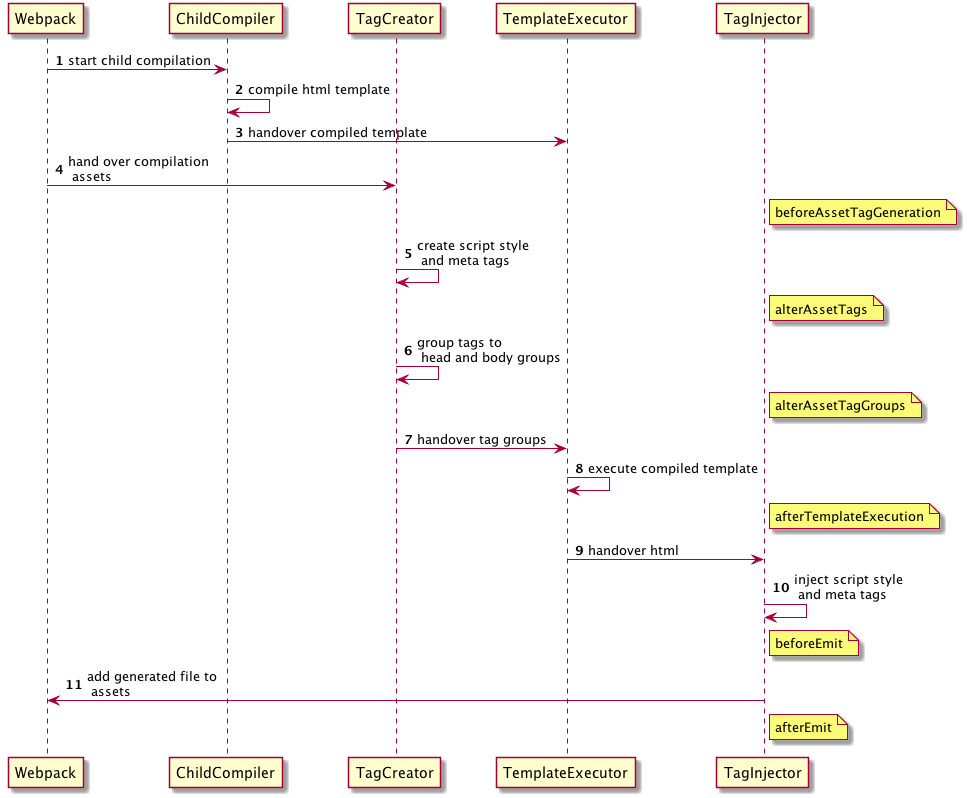](https://github.com/jantimon/html-webpack-plugin/blob/master/flow.puml)
#### `beforeAssetTagGeneration` hook
```
AsyncSeriesWaterfallHook<{
assets: {
publicPath: string,
js: Array<{string}>,
css: Array<{string}>,
favicon?: string | undefined,
manifest?: string | undefined
},
outputName: string,
plugin: HtmlWebpackPlugin
}>
```
#### `alterAssetTags` hook
```
AsyncSeriesWaterfallHook<{
assetTags: {
scripts: Array,
styles: Array,
meta: Array,
},
publicPath: string,
outputName: string,
plugin: HtmlWebpackPlugin
}>
```
#### `alterAssetTagGroups` hook
```
AsyncSeriesWaterfallHook<{
headTags: Array,
bodyTags: Array,
publicPath: string,
outputName: string,
plugin: HtmlWebpackPlugin
}>
```
#### `afterTemplateExecution` hook
```
AsyncSeriesWaterfallHook<{
html: string,
headTags: Array,
bodyTags: Array,
outputName: string,
plugin: HtmlWebpackPlugin,
}>
```
#### `beforeEmit` hook
```
AsyncSeriesWaterfallHook<{
html: string,
outputName: string,
plugin: HtmlWebpackPlugin,
}>
```
#### `afterEmit` hook
```
AsyncSeriesWaterfallHook<{
outputName: string,
plugin: HtmlWebpackPlugin
}>
```
Example implementation: [webpack-subresource-integrity](https://www.npmjs.com/package/webpack-subresource-integrity)
**plugin.js**
```js
// If your plugin is direct dependent to the html webpack plugin:
const HtmlWebpackPlugin = require('html-webpack-plugin');
// If your plugin is using html-webpack-plugin as an optional dependency
// you can use https://github.com/tallesl/node-safe-require instead:
const HtmlWebpackPlugin = require('safe-require')('html-webpack-plugin');
class MyPlugin {
apply (compiler) {
compiler.hooks.compilation.tap('MyPlugin', (compilation) => {
console.log('The compiler is starting a new compilation...')
// Static Plugin interface |compilation |HOOK NAME | register listener
HtmlWebpackPlugin.getHooks(compilation).beforeEmit.tapAsync(
'MyPlugin', // <-- Set a meaningful name here for stacktraces
(data, cb) => {
// Manipulate the content
data.html += 'The Magic Footer'
// Tell webpack to move on
cb(null, data)
}
)
})
}
}
module.exports = MyPlugin
```
**webpack.config.js**
```js
plugins: [
new MyPlugin({ options: '' })
]
```
Note that the callback must be passed the HtmlWebpackPluginData in order to pass this onto any other plugins listening on the same `beforeEmit` event
Maintainers
## Backers
Thank you to all our backers!
If you want to support the project as well [become a sponsor](https://opencollective.com/html-webpack-plugin#sponsor) or a [a backer](https://opencollective.com/html-webpack-plugin#backer).


 ## Contributors
This project exists thanks to all the people who contribute.
You're free to contribute to this project by submitting [issues](https://github.com/jantimon/html-webpack-plugin/issues) and/or [pull requests](https://github.com/jantimon/html-webpack-plugin/pulls). This project is test-driven, so keep in mind that every change and new feature should be covered by tests.
This project uses the [semistandard code style](https://github.com/Flet/semistandard).
## Contributors
This project exists thanks to all the people who contribute.
You're free to contribute to this project by submitting [issues](https://github.com/jantimon/html-webpack-plugin/issues) and/or [pull requests](https://github.com/jantimon/html-webpack-plugin/pulls). This project is test-driven, so keep in mind that every change and new feature should be covered by tests.
This project uses the [semistandard code style](https://github.com/Flet/semistandard).
 [npm]: https://img.shields.io/npm/v/html-webpack-plugin.svg
[npm-url]: https://npmjs.com/package/html-webpack-plugin
[node]: https://img.shields.io/node/v/html-webpack-plugin.svg
[node-url]: https://nodejs.org
[deps]: https://david-dm.org/jantimon/html-webpack-plugin.svg
[deps-url]: https://david-dm.org/jantimon/html-webpack-plugin
[tests]: https://github.com/jantimon/html-webpack-plugin/workflows/CI/badge.svg
[tests-url]: https://github.com/jantimon/html-webpack-plugin/actions?query=workflow%3ACI
[npm]: https://img.shields.io/npm/v/html-webpack-plugin.svg
[npm-url]: https://npmjs.com/package/html-webpack-plugin
[node]: https://img.shields.io/node/v/html-webpack-plugin.svg
[node-url]: https://nodejs.org
[deps]: https://david-dm.org/jantimon/html-webpack-plugin.svg
[deps-url]: https://david-dm.org/jantimon/html-webpack-plugin
[tests]: https://github.com/jantimon/html-webpack-plugin/workflows/CI/badge.svg
[tests-url]: https://github.com/jantimon/html-webpack-plugin/actions?query=workflow%3ACI
 Jan Nicklas
 Thomas Sileghem